Images by John 'K'
Life as seen through my lens…
Lunar Eclipse, 12/20/2010
Posted by on December 21, 2010
Some early images from last night’s lunar eclipse. I’ll be uploading more to Flickr as time permits…
Thankfully the really heavy cloud held off for most of the event, but we had to view most of the eclipse through a thin layer of cloud that made the viewing experience a little hazy.


Lunar Eclipse
Posted by on December 20, 2010

This shot was from the last lunar eclipse we got to see from California, on Feb 20, 2008. We’re in for another one tonight…
Unlike a total eclipse of the sun, which is only visible to those in the path of totality, eclipses of the moon can usually be observed from one’s own backyard. The passage of the moon through the Earth’s shadow is equally visible from all places within the hemisphere where the moon is above the horizon.
The total phase of the upcoming event will be visible across all of North and South America, as well as the northern and western part of Europe, and a small part of northeast Asia, including Korea and much of Japan. Totality will also be visible in its entirety from the North Island of New Zealand and Hawaii — a potential viewing audience of about 1.5 billion people. This will be the first opportunity from any place on earth to see the moon undergo a total eclipse in 34 months.
There is nothing complicated about viewing this celestial spectacle. Unlike an eclipse of the sun, which necessitates special viewing precautions in order to avoid eye damage, an eclipse of the moon is perfectly safe to watch. All you’ll need to watch are your eyes, but binoculars or a telescope will give a much nicer view.
The eclipse will actually begin when the moon enters the faint outer portion, or penumbra, of the Earth’s shadow a little over an hour before it begins moving into the umbra. The penumbra, however, is all but invisible to the eye until the moon becomes deeply immersed in it. Sharp-eyed viewers may get their first glimpse of the penumbra as a faint smudge on the left part of the moon’s disk at or around 6:15 UT (on Dec. 21) which corresponds to 1:15 a.m. Eastern Time or 10:15 p.m. Pacific Time (on Dec. 20).
The most noticeable part of this eclipse will come when the moon begins to enter the Earth’s dark inner shadow (called the umbra). A small scallop of darkness will begin to appear on the moon’s left edge at 6:33 UT (on Dec. 21) corresponding to 1:33 a.m. EST or 10:33 p.m. PST (on Dec. 20).
The moon is expected to take 3 hours and 28 minutes to pass completely through the umbra.
The total phase of the eclipse will last 72 minutes beginning at 7:41 UT (on Dec. 21), corresponding to 2:41 a.m. EST or 11:41 p.m. PST (on Dec. 20).
Don’t Panic
Posted by on December 8, 2010
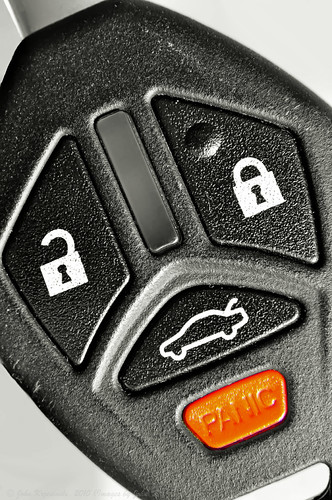
Don’t…, originally uploaded by Images by John ‘K’.
It’s funny how things you love lodge themselves in your head and shape what you do, often unconsciously.
I’m traveling on business this week, and as always I’ve brought my camera with me even through there are few opportunities to use it during the day. So sat in my hotel room after a fun meal with colleagues yesterday evening I was bored and was looking for something to inspire me to take a photo of. I took the key from my rental car and looked at it and thought a macro shot that fixated on the panic button could be fun, so I attached my 50mm prime F/1.8 lens to my D5000, stuck a magnifying filer on the end of the lens and took the shot.
After a quick play in Photoshop Elements 9 I had the image looking how I wanted and so posted it to Flickr. Job done.
Looking at a few of the comments that people had left on the image this morning, two people thought they could see a sad face in this, and now I look again, I can see it too. It immediately made me think of Marvin, the paranoid android from the Hitchhiker’s Guide to the Galaxy by Douglas Adams. I LOVE his work, those books, and am a big fan of the cult TV series based on the books, and sure enough there is a passing resemblance between the “face” in this and Marvin.
Compare for yourselves. Here’s a shot of Marvin, courtesy of the BBC.

The odd one out…
Posted by on November 24, 2010

This past summer I my wife (who has been working with the Girl Scouts of Northern California for over 5 years now) convinced me to join her as a helper at a residential Girl Scout camp that takes place each year at Camp Butano Creek in the Santa Cruz Mountains, a few miles inland from Pescadero on the California coast.
Each time my wife had been during previous years she had raved about the experience, and this year I decided to give it a try and see if it was all she was making it out to be. Being a man, my first though was that I would be more than a little out of place there, but I’m a strong believer in trying anything once, especially if there’s a possibility that it could be fun. It also seemed a good way to use up 5 days of paid volunteer time off that the company that I work for allocates to all of their employees every year.
A couple of months before the camp sessions I started my preparation – attended some mandatory training sessions and signed up as a Girl Scout. Yes… I am a registered Girl Scout! Anyone attending the camp needs to be a registered Girl Scout to benefit from the camp insurance. During the training sessions I got to know some of the other volunteers involved, and seeing just how committed they were to the camp, and experiencing the sense of friendship, camaraderie, and family that this group of wonderful people went a long way to removing some of the doubts about what I had signed up for!
Come the date of the first camp session my wife and I packed all of our camp kit and headed for the coast. We were soon integrated into the camp family, and before we knew it the campers arrived. I wasn’t the only male at camp, but we were very few in number for sure. Because of my interest in photography I mingled with the campers, capturing images of them as they took part in many of the camp activities.
As I couldn’t be a troop leader, I was put in with the “core” camp staff, and was allocated driving duties. This meant I got to drive one of the camp vans taking the campers to many of the off-site activities, which included horse-riding on the beach at Half Moon Bay, kayaking at Moss Landing, surfing at Santa Cruz, and beach-combing on many of the beaches near the camp along the Pacific coastline. I often got to stay with the troops as they took part in their activities and so was able to get some wonderful shots. Because almost all of the shots have photos of camp members that are identifiable, I am not allowed to share them, but as an example, here is one that I can share that I took during one of the surfing sessions.

At the end of each session, the camp program staff put together a slideshow that gets shown to the campers, and then to their parents as they come to collect their tired but happy children at the end of the week long session. My photos made up well over half of the slideshow, and the complements from all that saw it were very humbling and rewarding, making the whole experience even more worthwhile. The most rewarding aspect of the camp though was being there to see (and in some cases help) the girls face and overcome many different challenges and fears, emerging from the experience more confident in themselves and their abilities.
I loved the experience so much that at the end of the session I made arrangements to return for the 3rd camp session (my wife was going to be there too) – taking more time from work, this time out of my own vacation balance, to return for another week, and at the end of that I was so hooked on the whole thing that I signed up to help at next year’s sessions.
Who would have guessed that being the odd one out at camp could have been so much fun?!
Do you have a back-up plan?
Posted by on November 22, 2010
If not, WHY NOT?!

Disk drives are full of electronics and moving parts, and unfortunately they fail occasionally. But, with a little thought and preparation the data stored on a hard disk can be easily protected. High-end systems and dedicated data storage devices can do RAID striping and mirroring, and it is possible to get a similar level of protection in a high-end home computer with an investment in hardware, software and time.
All of this is great, but for the average user that level of protection is way over the top… however the average user still needs to protect their data for when the inevitable happens. I’ve been in the industry long enough to know it’s not IF a disk will fail, it’s WHEN, and if you have no means of protecting important files and folders on your computer then you are playing Russian Roulette with a part of your life.
With the amazing rise in the popularity of digital photography and digital videos, people are trusting their memories to a rapidly spinning piece of magnetic media that at some point in its life will fail. The failure might cause a file to get corrupted. It might cause you to lose access to a folder. Worst case it could cause you to lose access to everything that is on the disk. Some back up photos and movie files to CD or DVD (or more recently BlueRay) media, but this can be a royal Pain In The Ass.
Having been in the industry for a while, but not wanting to spend a small fortune on my home system to get the kind of data protection that most companies run their business with, I’ve worked out a strategy that balances an acceptable level of data loss with ease of use and management, and so protects the important information on my computer in a way that works for me.
Many computers nowadays come bundled with some form of backup software. If yours does, check it out. Most are linked with some sort of on-line data storage service, which is great for protecting important files, however you might find the amount of storage offered is limited, and speed could be an issue, especially if you don’t have a fast internet link. Backups to remote data stores don’t work well if you need to restore a totally trashed system drive, so keep that in mind also.
If you have a computer with a single disk, the best strategy without spending a fortune is to get an external USB drive with enough capacity to be able to store a backup of your whole disk, and either use the backup software that came with your computer, or ideally invest a little money to get a dedicated backup package.
Another thing to keep in mind is that a data protection strategy is only good if it WORKS. You should test it at least once before you need to rely on it. The worst time to discover that your backup system doesn’t work as you thought is when something has gone bad and you are relying on your backup strategy to be able to get things back the way they were before things went wrong.
I use and trust Acronis True Image Home. It’s saved my bacon (or that of someone in my family) on a number of occasions. It will do a full disk image backup (and can compress it too) and gives the flexibility to restore a full disk image, or at the file/folder level, and you can even mount a backup image as a disk and copy things from the backup on the fly. In the case of our house, we have a shared computer with a dedicated 2TB disk for backup images, and the family laptops back up across our home network to a share on this computer. Each computer has a boot disk that in the event of a failure can boot, access the network, and can restore from the previously taken backup to recover a failed disk.
The main computer I work on has a number of disks installed, and given that most failures happen at the individual disk level, I have each disk run a backup to another disk in the system. In the event of a failure it’s very quick to pull back files (or if necessary a whole disk) from a locally attached drive with the backup image on it. My important files back up to a removable disk, and in the case of my photographs, I have a second removable disk that is kept up to date nightly with my working photography files too.
Today I had a need to rely on all of this to recover from a disk failure. We were scheduled to have a 2 hour power outage for local power company work this afternoon, so before I went to work I closed my computer down. When I got home from work late this afternoon, I powered the system up. It started to boot and then hung. After doing some quick tests I worked out that while the system could see one of the attached disks at a basic hardware level, nothing could be read from the disk’s magnetic media. I removed it, attached it via a caddy to another computer just to see if there was any chance of recovering what was on this disk. No joy. The disk was DEAD!
So… I quickly popped out to our friendly neighborhood electronics superstore, picked up a new 1TB disk to replace the 500GB disk that had died (paid less for the new disk than I had for the old one too!), and in a few minutes had fitted it, formatted it, and had started restoring from the last backup I had taken. With the restore completed, I synced my most recent photographic images back from the external drive that held them, and after about 3 hours I was back in business.
The disk that died held all of my photos from 10 years of digital photography. I was able to get EVERYTHING back, even some shots I had taken yesterday evening! I would have been heartbroken if I had lost all of that work and all of those memories. Had I (like some) saved the files to optical disks, it would have taken me DAYS to have restored them to my new disk, and I’d still be scratching around trying to work out how to get back the other files that were also on that disk. Instead, after buying a replacement disk and investing a few hours of my time in the recovery of the contents, I was up and running as if nothing had happened (apart from the fact that I’d magically gained 500GB of storage!).
My advice to you therefore is to get an external drive, get a good backup application, and be sure to use it regularly! It may sound like an expensive waste of money, but trust me – the time will come when you will thank yourself for putting a few simple precautions in place.


 Images by John 'K'